Croakwood - Early Access Release Window & Gameplay Trailer

We're on track to release Croakwood into Early Access this winter!
Check out our new trailer that's giving a look at lots of new things:

What is Early Access?

Early Access means the game is available to buy and play while it's still being actively developed. The game regularly receives free updates with the newest completed features and content.

Why Early Access?

We think that we are able to make a better game by working together with our community. We experienced this with Parkitect, where the feedback we received has been incredibly helpful to make a bigger and better game than we would have been able to do on our own. While Croakwood has the benefit of so many of the lessons that were gained through that process, it is a very different game that both leans on our strengths and pushes into new territory for our small, but mighty team.

We have been developing this game for many years according to our own ideas, and now we are excited to see what people enjoy and what might need to be improved or expanded.
Early Access allows players to share their experiences and ideas about what the game should be, and gives us an opportunity to incorporate that feedback and adapt our plans accordingly with more flexibility than may be possible past full release.

Approximately how long will this game be in Early Access?

We expect it's going to take about 1-2 years to add the content and features that we have planned for the full release but we'll adjust our plans based on the feedback we receive and what the game needs, so this may change.

How is the full version planned to differ from the Early Access version?

We plan to add more content and features: more decoration and furniture sets, resources, workshops with new resource production chains, world biomes, activities for the villagers, characters you can meet, tasks for you to do and additional depth for the town management gameplay.

What will be the state of the Early Access version?

You will be able to construct and run a nice little town: design and decorate houses with many available decoration and furniture items with many customization options; build up various resource production chains and watch the villagers gather, craft and transport resources; watch enjoyable villagers as they inhabit your town; fulfill requests and meet your villagers needs.

Everything we've shown somewhere (like in devlog posts, trailers, screenshots or in the store page description) will be available.

Will the game be priced differently during and after Early Access?

The Early Access price will be lower than we expect it to be for the full release. We think it’s the fairest approach if the price reflects the state of the game at any given point in time, so we'll gradually increase the price as more content gets added.

How are you planning on involving the Community in your development process?

We’re reading and listening to all the feedback we receive on Steam forums, on our Discord, via our website and on social media.
We’re regularly posting updates on the development progress to allow everyone to track how things are going.

When exactly is the Early Access version going to be available?

We don't have a date yet! But we're confident that we can get everything we want to get done ready in time for an Early Access launch approximately within the November-February timeframe. As soon as we know more we'll update you :)

As you may be aware game development time requirements can be notoriously hard to estimate correctly and unexpected life events can happen. We're not expecting any delays, but in case anything unexpected happens we'll let you know.

Croakwood Devlog #11 - World Design

Hey! Don't forget to check out Wholesome Direct this Saturday :)

Wholesome Direct

1780761600

This month we made a lot of progress in how our game world is put together and designed.

The way our game world works is a bit like a puzzle. We have individual pieces that we design by hand, and then the game automatically pieces them together to create the world. We can rotate pieces, randomize where the connection points are and add some random content into the pieces for some additional variety. This way we can create a unique world for every player while still having a lot of manual control over the design of the pieces to make them look beautiful and interesting.

Here's what our editor for these pieces looks like:

We can add terrain to a piece, define where the playable area and possible connections to other pieces are and add decorations.
This isn't a tool that's intended for players currently, but eventually it would be really cool to make it available for everyone and to allow sharing player-created map pieces.

For gameplay, the idea is that players don't have access to the entire world from the start. You start in a certain location and then gradually get access to additional areas.

When we initially worked on this system a few years ago we thought it would be the best idea to pre-generate the entire world when you start a new save file and then mark everything outside the starting area "unexplored" - so it exists, you just can't access it yet. We thought generating the whole world at once would make things a bit easier for us, like controlling how the game progresses (like for example putting more advanced resource types further away from your starting area).
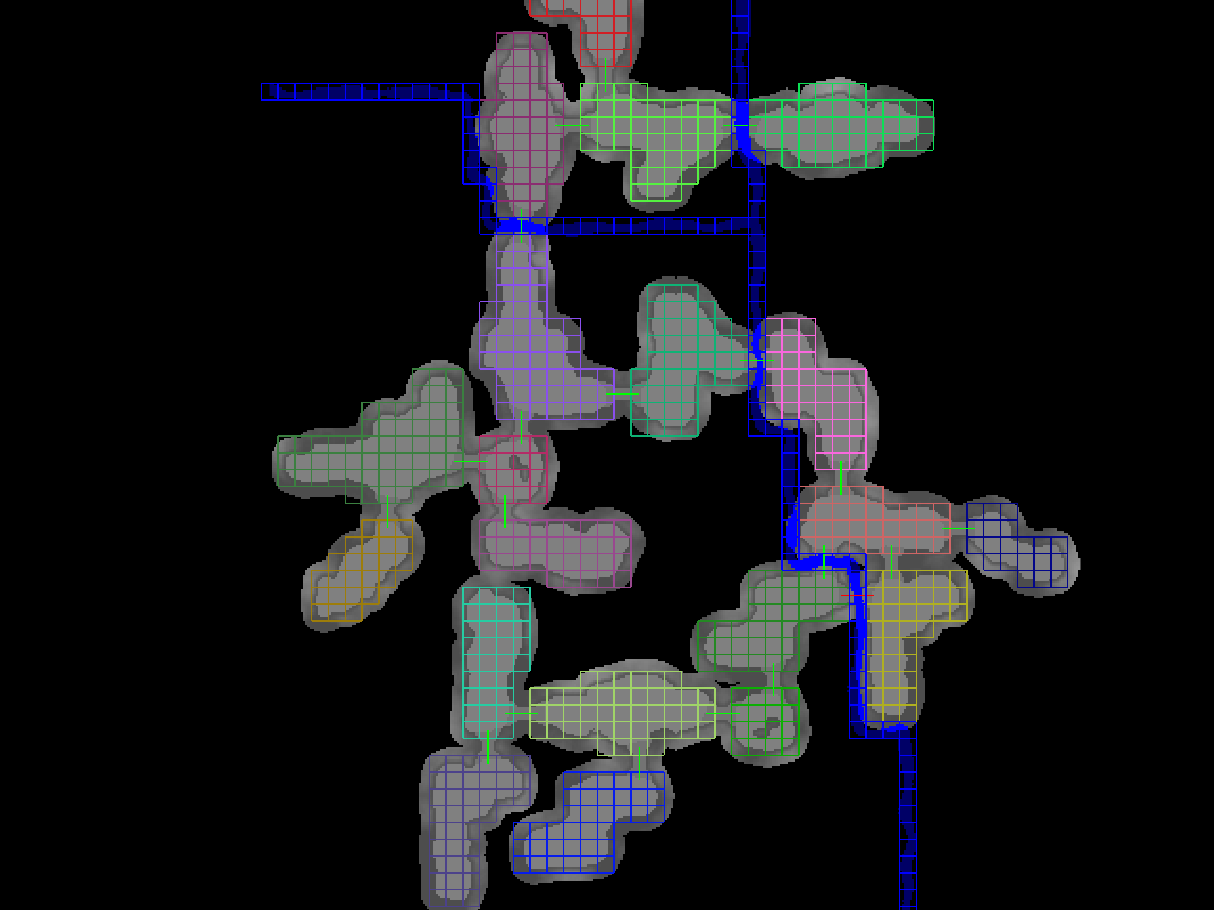
Here's a screenshot from a tool we used to prototype this. The colored boxes show which parts of the terrain come from the same puzzle piece, the light grey background shows the playable area and the darker grey shows the border around the playable area where we generate the forest.
Short green lines mark the connections between pieces and there's also some generated rivers in blue.

There's some problems with pre-generating the entire world though:

  • it's kind of wasteful to generate stuff that the player hasn't unlocked yet (takes up space in the savegame file and might require loading more data than necessary)
  • if we add more pieces to the game, players have to create a completely new save file and restart their town to have a chance to encounter them

We changed that this month. Now pieces only get added to the world once you unlock a new area.
This has been on our task list for a long time, so it feels really good to finally have it done!

And we started replacing our placeholder test pieces with properly designed ones.
It makes a huge difference for how alive the world feels and instantly makes everything look a lot more interesting and nicer, so that is a lot of fun for us :)
It's very exciting to see how every single piece being added immensely increases the variety of worlds being generated!

Croakwood Devlog #10 - How villagers interact with the world

Hey, it's been some time!
If you want to know what we've been up to, make sure to check out Wholesome Direct on June 6th :)

Wholesome Direct

1780761600

In one of the previous posts I described how the villagers navigate around the world and in this one I want to talk a bit about how they decide where to go and what to do.

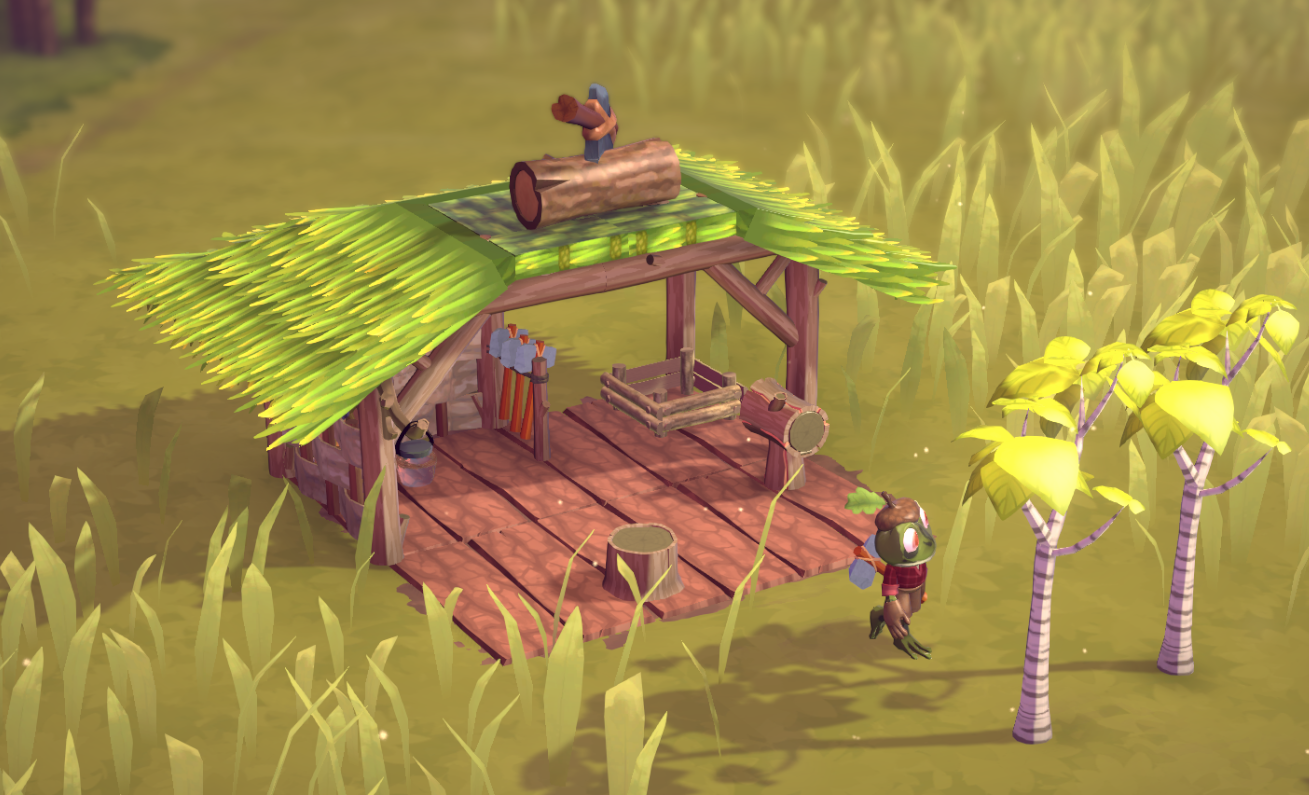
Let's take this woodcutter hut for example:

There's a tool rack containing an axe, a few trees around the hut and a place where logs can be stored.
It's quite obvious what needs to happen here in order to produce logs, but how do we put this into program code?
An easy solution would be having some code that says "if you're a woodcutter, here's step by step what you need to do: get the axe, chop a tree, carry the log to storage and put away the axe".
This could be done quite easily with a state machine or if you want something a bit more powerful with a behaviour tree.

That's how we implemented it initially and what we also did for the guests in Parkitect.
However, there's a few problems:

  • What if the woodcutter gets interrupted after chopping the tree? For example the player might have built a wall that prevents the woodcutter from returning to the workshop. The woodcutter is still holding the axe, and now there's logs on the floor that need to be transported away. Suddenly our clear list of instructions for what to do doesn't work anymore. We could provide multiple lists of instructions for different situations or make the instructions a bit more flexible (the first instruction in the example could say "get the axe if you are not already carrying it")... but that means we need to think of every possible combination of things that could possibly happen.
  • This doesn't create very natural looking behaviors. What if the woodcutter decides to chop two trees in a row? They would put away the axe after chopping the first tree, just to immediately pick up the axe again for the second tree. Maybe we could remove the "put away axe" instruction and allow them to keep carrying the axe, but when do they put it away then? For example they should definitely not hold the axe anymore when they go sleep. We could have a "put away any tool you're holding" instruction as the first item in our "how to sleep" instruction list, but again: for every behavior a villager can do we'd have to think of every possible state they might be in and make sure it's something valid.

So this felt like a pretty fragile solution and we've been struggling with it for some time until we learned about Goal-Oriented Action Planning (GOAP).
GOAP is a planning system that generates the necessary list of instructions in order to achieve a certain goal.
It's a bit like pathfinding, but instead of searching through a list of positions to find a path to a certain location you're searching through a list of possible instructions to find a valid sequence.
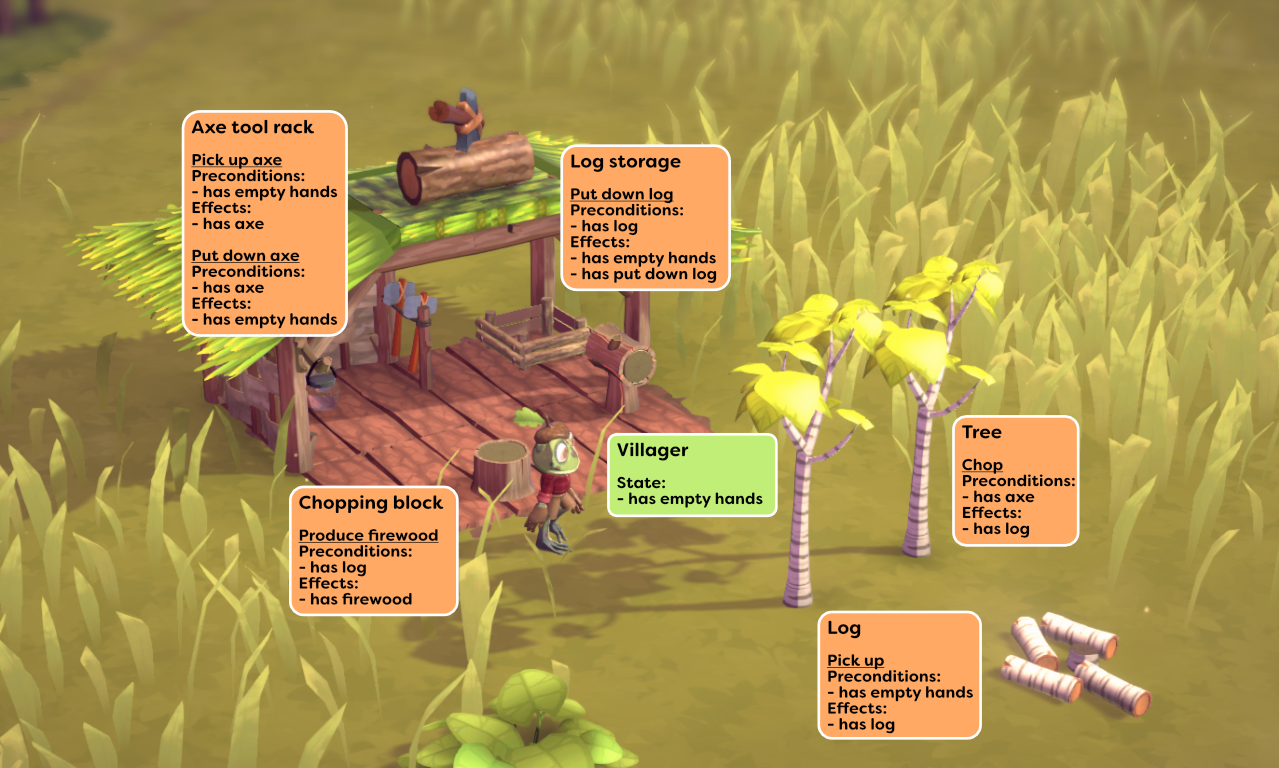
The way it works is that first we need to define what actions are available to the villager, and every action also has a list of preconditions that need to be fulfilled in order to be able to execute the action, and a list of effects the action has.
For our woodcutter example it looks like this:

If we now give the villager a goal of "has put down log" the GOAP algorithm takes all of these actions and tries out all valid combinations in a somewhat smart way until it finds a sequence where the last action has an effect of "has put down log".
So for example the trees now offer a "chop" action that has a precondition of "has axe" and an effect of "has log". The villager is not holding an axe currently so this action is not possible.
The axe tool rack has a "pick up axe" action with a precondition of "has empty hands" and an effect of "has axe". The woodcutter is not holding anything currently so this action is possible, and then afterwards the "chop" action becomes possible because its precondition has been fulfilled now and it keeps going like this until finding the "put down log" action of the log storage.

This is really cool, because now we just have to define all of the individual actions correctly which is a lot more manageable and less error-prone.
What's also great is that this makes adding new objects and behaviors into the game quite easy! We just have to set up the new actions an object provides and maybe define a new goal and the villagers can immediately interact with it. It feels so much easier than our initial approach that it's a bit like magic.
Sometimes it even leads to surprises where the villagers reach a goal in a way that makes complete sense but we did not expect :)

The downside of course is that generating the action sequences is not free in terms of computations, especially if there's a large list of possible actions to try, so it's important to keep that list as small as possible. What's also a bit tricky is that Croakwood towns can have many villagers and they are all following their own plans, but because it usually takes quite some time to complete an action list there's not many of them having to create new plans at the same time.
So far this has not been an issue but it's something we'll need to keep an eye on.

Croakwood Devlog #9 - Object Placement Tools

In preparation for Game Garden and in the time afterwards we've spent some time on polishing how placing objects works.

Placing objects is one of the main things you do in this game of course, so it needs to feel good and be intuitively understandable.
There's a few considerations we have to make for these tools. There are some restrictions we need to make simply due to how the game works, but generally we want to give players a lot of freedom so they can design their town however they want. At the same time we want everything to feel playful and easy to understand, and not like you're using some sort of 3D modeling software.
How fast you're able to get to a good looking result is also a very important consideration. We want players to be able to design a full house within a few minutes.

One basic tool that helps with this allows you to quickly duplicate any existing object:

Oftentimes this makes it unnecessary to search through the menus for the object that you're looking for, so this already speeds up building a lot.

Sometimes you just want to move an object. You could use the duplication tool to create a new object, then delete the old one... but simply picking up the object and moving it feels much nicer and better :)

And of course sometimes you just want to be able to go back a few steps, so there's undo.

Undo is one of the most-requested features for Parkitect. Unfortunately it's not something that can be added easily into a game that wasn't designed with undo in mind.
For Croakwood we knew that people would really want to have this, so we made sure to add support for this very early on.

We differentiate between two different types of objects, decorations and furniture.
Decorations are objects like plants, vases or crates and we allow players to place them very freely. They aren't locked to any grid and don't have any collision, so you can use them in a lot of creative ways.
Decorations can be rotated quite freely.

Furniture are objects that the villagers need to interact with, like chairs, tables or beds. Due to technical reasons furniture had to be locked to a grid and to 90° rotations so far.

Another nice side-effect is that this made furniture placement pretty quick due to the limited options, and we liked that figuring out how to fit all the required furniture into a house felt a bit like a small puzzle game.
Due to improvements we made to villager movement this year the technical limitations that required furniture to be on a grid do not exist anymore and we wondered... would it hurt to give a bit more freedom?

After giving it a try it's working quite well - the furniture still collides so your space is still limited, and the added freedom gives you more options for decorating the houses without adding significant complications. So we're keeping it like this for now :)

For some objects you can drag to create multiple of them in a row, and they can snap together automatically:

One case where it's not very fun to build something out of many individual tiles are roofs. They can have fairly complex shapes and there's a large number of pieces.

Having to piece these back together isn't very fun, so instead there's a tool that does it for you.
Getting this to work well took quite some time but it's pretty good finally :)